Back in the day when jQuery ruled the roost, we would use the ready handler to make sure our code ran after the DOM and stylesheets had completely loaded.
$( document ).ready(function() {
  // Handler for .ready() called.
});
(Or, more likely, the recommended version.)
$(function() {
  // Handler for .ready() called.
});
But of course we don’t rely on loading jQuery in our head anymore. But nobody wants to write out the full logic manually.
But if we’re loading our code asynchronously, we kind of have to. Some people went as far as to synchronously load their JavaScript right before the </body> tag. That will make sure everything is ready when it runs, but at the cost of loading all your JavaScript later.
But there is a nice, short boilerplate that you can use that makes it easy to trigger on ready:
const ready = new Promise((resolve, _) => {
    if (document.readyState !== 'loading') resolve();
    else document.addEventListener('DOMContentLoaded', resolve);
});
Slap that basically anywhere and you can then run ready.then( ... ) anywhere in your code base that you can see it. And you don’t need to be careful about making sure there’s only one declaration. (Unless you have dependencies on initialization order.) A short handful of lines to give you a more fluent syntax for scheduling things on ready.
And unlike the old jQuery version, you don’t need to load it synchronously before everything else.
Let’s start by thinking about browser support. A lot of our historical solutions came from a world where ongoing support for IE was an issue; thank goodness we don’t live there anymore. Our biggest danger these days is someone coming to our site with an old phone that has a several years old version of webkit or chromium. Especially if they are using an app-hosted browser that uses a system webview.
There are 3 browser engines commonly in use, and 3 obsolete browser engines. These are our browser grades:
A-grade experience: If someone comes to the site with an up-to-date browser running Gecko, Blink, or Webkit, we want to give them the full experience.
Obsolete C-grade experience: If someone comes to the site with an out-of-date browser running Gecko, Blink, or Webkit, we want to give them the plain HTML experience.
Archaic C-grade experience: If someone comes to the site with a browser running Trident (IE,) Spartan (Old Edge,) Presto (old Opera,) or some other ancient thing (Netscape? iCab? Lynx?) we want to give them the plain HTML experience.
It’s probably worth the time to add a few more functional requirements:
Opt-In: We’ll have to develop a plain HTML experience for our site. It would be nice to be able to develop this in a modern browser, so we should be able to opt-in to the plain HTML experience for development.
ES3/Jscript Compatible: If we write any code that decides if we should load our JavaScript and CSS, that code will have to run successfully in any browser. Not just any modern browser; any browser. This means limiting ourselves to EcmaScript version 3, and also to the limitations of the not-quite compatible JScript. This code will be written like it’s 1999.
Let’s write some code
The simplest answer is to load our full experience with a module tag, and let it load everything.
<script type="module" src="./main.js"></script>
And maybe you can get away with that. But this is likely to leave you with a Flash of Unstyled Content, as your CSS won’t be loaded until your JavaScript runs.
We really want something like this:
if (browserIsGood) {
  loadJavascriptAndCSS();
}
Okay, that’s a simple structure, but there’s a lot of handwaving happening there. Let’s dig in.
Loading JavaScript
Can we just use dynamic import?
if (browserIsGood) {
  import("./main.js");
}
No, we can not! import is a reserved keyword in JavaScript. This will crash if you try to run it in a browser that doesn’t support dynamic import. We’ll have to load it the old fashioned way.
Everyone knows how to do this by now, right?
var target = document.getElementsByTagName("script")[0];
var head = target.parentNode;

function insertScript(src) {
  var s = document.createElement("script");
  s.setAttribute("src", src);
  s.setAttribute("type", "module");
  head.insertBefore(s, target);
}

if (browserIsGood) {
  insertScript("./main.js");
}
Here we use the first script tag as the target for inserting, because the page might not have a head tag, and we create a script tag dynamically. Our JavaScript will be loaded asynchronously, so we’ll need to wait for DOMContentLoaded before we do anything. But these are table stakes for a modern web site these days. No big deal.
Loading CSS
So how can we load CSS dynamically without causing a FOUC?
var target = document.getElementsByTagName("script")[0];
var head = target.parentNode;

function insertStyle(src) {
  document.write('');
}

if (browserIsGood) {
  insertStyle("./main.css");
}
Wait, really? document.write? Yes. I’m sorry, but if you want to prevent a FOUC, you need there to be a link tag in the head before the parser sees the body. Browsers will block rendering in that case, and will not block rendering, leading to a FOUC in every other case.
Unless you want to get a little crazy and do it all yourself.
var target = document.getElementsByTagName("script")[0];
var head = target.parentNode;

var hide = document.createElement("style");

function hideDocument() {
  hide.innerText = "body {display:none;}";
  head.insertBefore(hide, target);
}

function handler() {
  head.removeChild(hide);
}

function insertStyle(src) {
  var ss = document.createElement("link");
  ss.setAttribute("rel", "stylesheet");
  ss.setAttribute("href", src);

  if (ss.addEventListener) {
    ss.addEventListener("load", handler, false);
    ss.addEventListener("error", handler, false);
    waiting[ss.href] = true;
  }

  head.insertBefore(ss, target);
}

if (browserIsGood) {
  hideDocument();
  insertStyle("./main.css");
}
Here we add a style tag that hides the body tag, and then we remove it once the stylesheet loads (or fails to load). Note that we only call hideDocument once we know we’re inside a good browser.
Browser Grading is all well and good, but eventually you have to actually do something different in the browsers you want to get the full experience and the browsers you want to have a simplified experience. Today, we’ll blitz through a bunch of techniques that people have used in the past to do this.
Ultimately, all of these techniques are about Graceful Degradation. There’s a lot of discussion out there about Graceful Degradation and its politer cousin Progressive Enhancement. But to handle truly incompetent browsers, we basically want to turn off all the fancy stuff. Generally speaking, this means you want to load your JavaScript and CSS only if the browser is good enough to use it.
IE Conditional Comments
Good ol’ Internet Explorer has a weird feature called conditional comments that lets you write HTML that only shows in IE, or only shows in non-IE browsers. Of course, when they made IE slightly better, they turned it off so that they would get the good code, but IE 5-9 can be excluded this way.
<!--[if !IE]> -->
According to the conditional comment this is not IE 5-9
<!-- <![endif]-->
CSS Hacks
By taking advantage of known CSS parsing limitations, you can write CSS that will only be read by certain browsers. Be careful that you don’t end up writing two different stylesheets in one file though.
This famous CSS hack sends different widths to older IE browsers and other browsers, which was super important when IE improperly implemented the CSS Box model.
Instead of checking for browsers, what it we checked for features! Several JavaScript libraries made this convenient, with has.js and Modernizr being the hottest ones back in the day. Modernizr is even still being maintained!
But we don’t really want to test every single feature. We want to know if the browser is capable enough or not. This is really a boolean test. The BBC came up with a test they called Cutting The Mustard, to see if a browser is really modern. The original test passed on IE9+ and Android Webkit, which you probably don’t want to support today. An updated cut removes those two obsolete browsers.
If you want to build web sites that actually work, you have to take into account the wide variety of browsers that might visit, and take steps to make sure that everyone can use your site. The question is, what are you going to do when someone comes to your site in a browser that doesn’t actually work?
A lot of sites just fail, in that they are completely unusable. But a little forethought can keep the basics of your site usable for anyone. If your site is a full-on app and someone comes by in IE3, there’s nothing to do but tell them to come back with a real browser. But you can at least successfully do that! If you’re building a site for a restaurant, people really only want the address and hours, and you should be able to deliver that to any browser.
One of the earliest systematic attempts to handle this issue was Browser Grading: giving plausible browsers a grade for how good they were, and making sure they got appropriate content. For years, the king of browser grading was Yahoo, or actually, the Yahoo UI Library.
Yui evaluated browsers on 4 criteria:
Identified vs. Unknown There are over 10,000 browser brands, versions, and configurations and that number is growing. It is possible to group known browsers together. Capable vs. Incapable No two browsers have an identical implementation. However, it is possible to group browsers according to their support for most web standards. Modern vs. Antiquated As newer browser versions are released, the relevancy of earlier versions decreases. Common vs. Rare There are thousands of browsers in use, but only a few dozen are widely used.
They then gave browsers one of 3 grades: A, C, or X.
A-Grade browsers were identified, capable, modern, and common. They were identified with a whitelist. They got full QA Testing
C-Grade browsers were identified, incapable, antiquated, and rare. They were identified with a blacklist. They got sparse QA Testing, but bugs were still addressed.
X-Grade browsers were all others. They were unidentified and QA did not test them.
A-Grade browsers got the full functionality of the site. X-grade browsers were assumed to be trying, and got the full functionality too.
C-Grade browsers…
C-grade is the base level of support, providing core content and functionality. It is sometimes called core support. Delivered via nothing more than semantic HTML, the content and experience is highly accessible, unenhanced by decoration or advanced functionality, and forward and backward compatible. Layers of style and behavior are omitted.
In February of 2007, YUI’s browser grading chart looked like this:
Win 98
Win 2000
Win XP
Mac 10.3.x
Mac 10.4
IE 7.0
A-grade
IE 6.0
A-grade
A-grade
A-grade
Firefox 2.0.*
A-grade
A-grade
A-grade
A-grade
A-grade
Firefox 1.5.*
A-grade
A-grade
A-grade
A-grade
A-grade
Opera 9.*
A-grade
A-grade
A-grade
A-grade
A-grade
Safari 2.0*
A-grade
They had just dropped support for IE 5.5, Firefox 1.0, Netscape, and the Mozilla App Suite.
In 2010, they supported at A-grade IE 6, 7, 8 and 9, Safari 5, Firefox 3.6 and 4, Chrome (latest stable), and Android Webkit. C-grade browsers were listed as IE < 6, Safari < 3, Firefox < 3, Opera < 9.5, and Netscape < 8. They forecast that they would discontinue support for IE 6, dropping it to C-grade.
In 2011, they chickened out, and removed grades from their support page. You can find a list of dead links to their removed blog posts, if you want to grovel around in the internet archive and see what it used to look like. In fact, I wrote this post because all the source documents have been removed from the Internet.
Right as Yahoo was chickening out, jQuery Mobile was trying browser grading too. They had the guts to give out “F”s to Windows Mobile 6.1 and Blackberry 4.5 for a hot minute, if you want to grovel around in the Internet Archive.
They also gave “B”s:
B Medium Quality. Either a lower quality browser with high market share or a high quality browser with low market share.
They eventually settled on full support for A-grade browsers, support without AJAX page transitions for B-grade browsers, and plain but functional HTML for C-grade browsers.
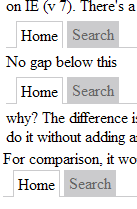
Update: There is now an answer on the stackoverflow question; One of the css rules makes the li tag white — it doesn’t have to, because the a is white. IE takes the spaces between the lis, and puts them in the enclusing td. This pushes the li down, causing it to overlap the border line.
I’m adding css-based tab navigation to a site that is still using table-based layout. When I place my tab list inside a td, there is a visual “gap” that you can see. If I put an empty div with “width: 100%” in the td, then my tab list displays correctly. (It also works fine outside the table.)Why does the div make the tabs lay out correctly, and is there a better way to make them do so without adding a content-free div?Here’s my test case: Test Case: Why does layout change in IE when UL is alone in a TD vs having an extra empty DIV?And a Screen Shot:
So, when I fix a bug, I like to wrap a test around it to catch regressions. When I wrote the test for the bug discussed under Debugging adventures with DBD::Sybase, I had to make an unusual work-around…
eval {
    # ick. ick. ick. You didn't see me do this.
    no warnings 'redefine';
    local *App::is_schedule_found = sub { pass("called bogus func");  return (1, 'ok'); };
    ($ok, $msg) = App::process_row($dbh, $questionable_row);
    ok($ok, "processing row: $msg");
};
unlike($@, qr/^Panic: Can't have multiple statement handles on a single database handle when AutoCommit is OFF/,
        "Sybase Error Handling busted");
I’ve changed the package name to “App” to protect the guilty. process_row calls is_schedule_found, and bails out if it’s not found. Since this bug only show up when testing against the real database, I can’t fake out the data source. So I insert the appropriate prerequisite data, and then run the procedure. But I don’t want to build up the whole structure just to adjust one table. (The database doesn’t have integrity constraints… Not my preference, but that’s how it is today.)
So I replace the function that checks for the schedule with one that always returns true. I don’t need to dependency inject a mock with an interface, I just adjust the global symbol table.
So, I recently debugged an error in some code I inherited. It was a relatively bizarre corner case that I thought might be interested.
The code is Perl running on windows, accessing a sybase database using DBI and DBD::Sybase.
This was the basic structure of the code:
 sub process_record {
	my $record = shift;

	if (is_record_in_db($record)) {
		if (mark_existing_record_deleted($record)) {
			insert_record($record);
		}
	} else {
		insert_record($record);
	}
}
There was some other stuff in there too, but it doesn’t matter for this story.
This code had been in production for about a year, and it’s been working fine. Suddenly we start getting this error:
Panic: Can't have multiple statement handles on a single database handle when AutoCommit is OFF
It also gives a line number from the bowels of DBD::Sybase. I try to get a full stack trace by running it under -MCarp=verbose . But, DBD::Sybase doesn’t croak, it dies, so I can’t see which call of mine is killing it. I don’t feel like hitting the debugger yet, so I think some more.
Now, this error comes only after we’ve processed 5000 or so records, so I take a look to see what’s different about the record where it fails, and I notice that it takes the path which calls mark_existing_record_deleted, while none of the others do. (Inserts heavily outnumber updates on this application.)
(Note: all of the called routines access the database.) DBD::Sybase doesn’t allow you to have multiple statement handles. So I look in the code and see that, sure enough, mark_existing_record_deleted doesn’t have a call to $sth->finish . But neither does is_record_in_db! Now I’m wondering, “how does this thing work at all?”
The answer is, that DBD::Sybase automatically finishes the handle for you when you read past the last row. So when there’s no data in the database, the query in is_record_in_db returns no rows. One fetch is “past the end,” so the handle gets closed. But when there is data, the query handle is open, causing the application to die when you try to open another handle in mark_existing_record_deleted.
So, watch out for that when you write code against Sybase.